Local SEO for Doctors: What Your Photo Files Reveal
Local SEO for doctors comes down to four things a practice controls: a complete and accurate Google Business Profile, a separate page for each location and each provider, the same name, address and phone details everywhere the practice is listed, and reviews it has genuinely earned. None of that is specific to medicine, and four other guides will explain it well.
What is specific to medicine is the material sitting alongside it. A practice publishes photographs: of the building, the team, the treatment rooms, sometimes of clinical work. Every one of those files records where it was taken, when it was taken and which device took it. Your website never shows you that, and a medical practice has a reason to care that a plumber does not.
What local SEO for doctors actually involves
The short version, because it is genuinely short and the rest of this page is the part nobody else covers.
- One profile per physical location, with the practice's real categories, hours and services filled in completely.
- A page per location and a page per provider. These answer different searches and should not be merged.
- Identical contact details everywhere the practice appears, down to the suite number.
- Reviews you asked for honestly, and replies that disclose nothing about the patient.
That last clause is where healthcare starts to diverge from every other local business, and it is the same divergence this article is about: a medical practice cannot publish freely, because its ordinary working material is about identifiable people. Replies to reviews are the version practices have usually thought about. Photographs are the version they have not.
The photo problem the checklists skip
Every guide on this subject tells a practice to upload real photographs rather than stock images, which is sound advice. None of them mentions that a photograph is a file, and that the file carries a block of details written automatically by the camera or phone that produced it.
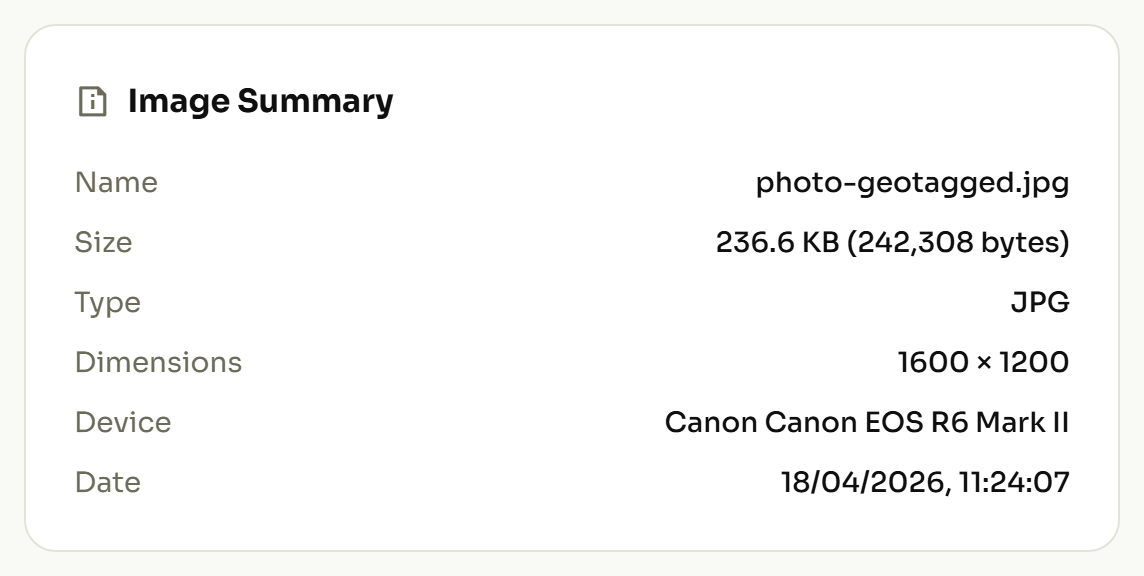
That block does not appear in your practice management system, your website's media library or the upload screen of a Business Profile. It travels with the file. Anyone who downloads the image gets it too. To see it on your own material rather than take it on trust, read what one of your own photos records. A team photo or a clinic exterior is enough to make the point.
What the de-identification standard already says about location and dates
Your practice already works to a definition of what makes information identifiable. The Safe Harbor method of de-identification lists eighteen identifiers, and for information to be treated as de-identified under that method, they have to be removed. Two of the eighteen describe things a photograph file records on its own, with nobody choosing to include them.
(B) All geographic subdivisions smaller than a State, including street address, city, county, precinct, zip code, and their equivalent geocodes…
(C) All elements of dates (except year) for dates directly related to an individual…
Read those against what a phone writes into a photograph. A coordinate pair is an equivalent geocode, and it is finer than a street address. A capture timestamp is an element of a date, accurate to the second. A photograph taken at a patient's home during a visit, on a device with location services switched on, records both without anyone deciding that it should.
The list also covers the picture itself at item (Q), "full face photographic images and any comparable images", and closes at item (R) with "any other unique identifying number, characteristic, or code". You can read the full list in the regulation itself rather than in anyone's summary of it.
This page is not legal advice and cannot tell you what your obligations are. Whether any particular photograph raises an issue is a question for whoever owns compliance in your practice. What this page can tell you is the factual part they will need: the file records a location and a time, and neither is visible from the software you upload it with.
What a clinical or on-site photo records
Four things are worth knowing about. The tag names are given so you can search for them; the column that matters is the second one.
| What the file records | Why it matters to your practice |
|---|---|
Where it was taken (GPSLatitude, GPSLongitude) |
In the clinic this is your own address. On a home visit or an off-site encounter it is the patient's, to within a few metres. |
When it was taken (DateTimeOriginal) |
A time accurate to the second, which can be compared against an appointment schedule by anyone holding both. |
Which device took it (Make, Model, Software) |
Ties every image from one handset together, linking a published gallery to one clinician's personal phone. |
Who is named in it (Artist, Copyright, ImageDescription) |
Camera apps and editing software fill these in automatically, frequently with a staff member's full name. |
The first row is the one that changes behaviour. A photograph taken inside your building discloses your own address, which is on your website anyway. The same photograph taken anywhere else discloses a different address entirely, and that is the case a practice has usually never considered.
Explore our electrician seo guide for industry-specific tips.
Does geotagging photos improve a practice's ranking?
Advice to add coordinates to your photographs for local visibility circulates widely in healthcare marketing, and it has been tested. An agency ran a ten-week controlled trial across 27 businesses: five weeks posting to Google Business Profiles on a fixed schedule, then five weeks repeating that schedule with coordinates written into the images. Of seven metrics tracked, one improved and four got worse.
The single improvement appeared on "near me" searches within the tagged areas. The reported trade-off was blunt: "Although it helps the 'near me' queries in those targeted areas, it hurts everywhere you don't add geotagged images."
Google's own published requirements for Business Profile photographs are narrow: JPG or PNG, between 10 KB and 5 MB, in focus and well lit, with the image expected to represent reality. They say nothing about location data in either direction. For a medical practice the sensible reading is that adding coordinates buys nothing worth the exposure, and that the useful direction of travel is the other one.
Where images genuinely do help is the part you write. Google's image guidance calls alt text the most important attribute for describing an image, and warns in the same document that stuffing keywords into it risks the site being seen as spam. Describe the photograph plainly.
A check before a photo leaves the practice
Five steps, applied once to what is already published and then to anything new.
- Turn off location services on every device used for clinical or patient-facing photography.
- Set the clock correctly on each camera, then confirm it on one exported file.
- Open one photo from each source and see what that source records.
- Before publishing, clear the location and correct the date.
- Give your compliance owner the list of what the files record, and let them rule on the clinical ones.
Step one prevents the problem rather than cleaning up after it, and costs nothing. For photographs already on your website or profile, you can remove a location from a photo that already has one and republish the cleaned version. The same audit applies to any practice publishing pictures of its own work. The same audit for a dental practice covers the before-and-after case in more detail.